
Mail from the ISS: SSTV images with a Raspberry Pi and a magnetic-base antenna
Summary
From 2 to 6 October 2026, the International Space Station is transmitting twelve images via SSTV on 437.550 MHz as part of ARISS Series 33. I received them in Meerane with a Raspberry Pi, an RTL-SDR stick, a simple magnetic-base antenna and OpenWebRX+, and on the first usable pass two images came through cleanly. The deciding factor was not the antenna, but a small script that tracks the frequency during the pass and saves the images itself.
What is being sent from up there
ARISS stands for Amateur Radio on the International Space Station. The programme connects schools with the crew by radio and operates the amateur radio station on board. Several times a year the team switches on an SSTV transmitter, this time under the motto “Student Education”. The page Upcoming SSTV events lists start and end in UTC, the frequency and the image mode, and interruptions are announced there too.
SSTV stands for Slow Scan Television: an image is transmitted as a sequence of tones, line by line, much like a fax. The ISS uses the Robot 36 mode. An image of 320 × 240 pixels takes 36 seconds, followed by a two-minute pause, and then the next one comes.
You do not need a radio to receive it. Any SDR stick that can receive the 70 cm band is enough.
My receiver
Since May 2025 I have been running a Raspberry Pi 3 B+ with an SDR stick. I started with a Nooelec NESDR SMArt v5 (affiliate link: if you buy something, I get a small commission and the price does not change for you); today an RTL-SDR Blog V4 is plugged in. Both use the well-known RTL2832U chip.
The antenna is an Albrecht AE-Skyscan Mag 1300 (affiliate link), a 64 cm scanner antenna with a magnetic base for 25 to 1300 MHz and 4 m of RG-58 cable. No directional antenna, no mechanical tracking.
The Pi runs OpenWebRX+ in a Docker container, publicly available at owrx.bk99.de. I created a separate profile for the ISS: 437.550 MHz, narrowband FM, and the SSTV decoder is already built into OpenWebRX+. The centre of the receiving range is deliberately 150 kHz away from the signal. Many RTL-SDR sticks have an interference spike exactly in the middle, and you do not want that on top of the wanted signal.
The real problem: Doppler
The ISS flies at around 7.7 km/s. When it approaches me, the signal is about 10 kHz higher; when it moves away, correspondingly lower. The FM filter in OpenWebRX+ is only ±4 kHz wide, though. If you do not retune, the signal stays in the filter only briefly around the highest point.
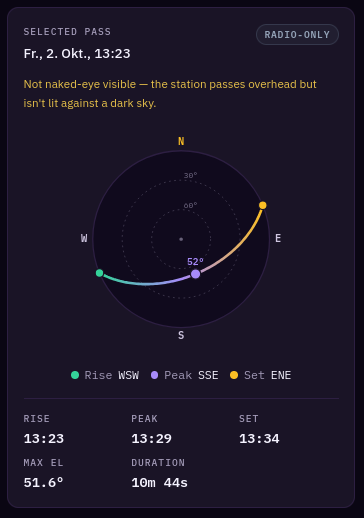
It is worst exactly where reception is best. During the midday pass, the first complete image transmission ran right through the highest point. In those 36 seconds the frequency drifted by 4.3 kHz, more than half the filter width. In the browser, fixed at 437.550 MHz and without automatic tracking, the image did arrive, but with lots of interference.
What you can take away: For satellites in low orbit, tracking the frequency matters more than a few extra dB at the antenna.
A script instead of mouse clicks
Then came a surprise. OpenWebRX+ only saves SSTV images when the decoder runs as a background service. Whatever is decoded in the browser exists only in the browser window.
So I wrote a small Python script. It connects to OpenWebRX+ via WebSocket like a normal visitor, sets FM and SSTV and calculates the Doppler shift every second from the current orbital data from CelesTrak. For this I use the Python library Skyfield. The corrected frequency goes to the receiver, and every decoded image line ends up in a PNG file. I did not have to change anything in the OpenWebRX+ configuration for this.
The script is started three minutes before the pass by a one-off systemd timer; before that, it fetches fresh orbital data.
You can download the script here: iss_sstv_capture.py. It needs Python 3 with websockets, Pillow and Skyfield. The address of your own OpenWebRX+, the location and the orbital data are passed when it is called; the instructions are at the top of the file.
The result
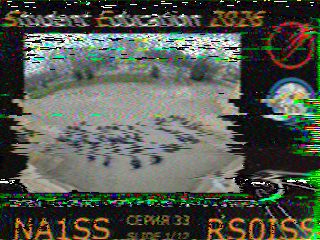
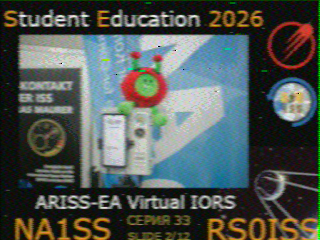
During the pass on 2 October at 13:25, two images arrived completely. At 13:30:04, with the ISS almost at its highest point, slide 1 of 12: Italian students recreating the lettering “ARISS” in their schoolyard. At 13:32:43, with the ISS only about 15 degrees above the horizon, slide 2 of 12: “ARISS-EA Virtual IORS”.
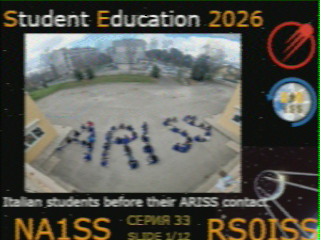
The direct comparison of slide 1 shows the difference: same transmission, same antenna, same stick. With tracking the image is clean, without tracking it is full of stripes.
Slide 2 surprised me more. The ISS was already 1300 to 1550 km away and only 10 to 14 degrees above the horizon, yet the image is hardly worse. Far away, the Doppler shift barely changes, only by 0.2 kHz during the whole transmission. According to ARISS, the ISS transmits with ten watts. From 1500 km that is enough for a magnetic-base antenna, as long as the frequency is right.
One transmission shortly after the ISS rose was visible in the browser, but the script missed it. I do not know why yet.
What you can take away
- The ISS transmits SSTV several times a year. The dates are on the ARISS page, often with only a few days’ notice.
- A Raspberry Pi with an RTL-SDR stick and a simple scanner antenna are enough for reception. Frequency tracking matters more than expensive equipment.
- If you use OpenWebRX+ and want to keep the images: save them in the browser by clicking on the image, or use the background service or a script of your own.
- High passes above 50 degrees give the best chances. A pass of eight to ten minutes allows for three images.
- You can upload received images to the ARISS SSTV gallery and get a certificate for the respective event.
Numbers at a glance
- ARISS Series 33 transmits from 2 October 2026, 09:00 UTC, to 6 October 2026, 15:55 UTC, on 437.550 MHz in Robot 36 mode.
- A Robot 36 image has 320 × 240 pixels and takes 36 seconds, followed by a pause of about two minutes.
- The Doppler shift on 437.550 MHz reaches up to ±10 kHz during a pass.
- During slide 1, the receive frequency changed by 4.3 kHz in 36 seconds, during slide 2 by only 0.2 kHz.
References
- ARISS: Upcoming SSTV events
- ARISS SSTV Gallery
- OpenWebRX+ (luarvique)
- Skyfield, Python library for orbital calculations
- CelesTrak, current orbital data
Remarks
- The capture script takes one of the four listener slots on owrx.bk99.de and switches to the ISS profile for the pass, even if someone else is listening at the time.
Links to the original source and the Web Archive open in a new tab.