
WD My Cloud EX2 Ultra: OpenWrt, a brick and a Flipper to the rescue
Summary
In October 2026 I installed OpenWrt on my WD My Cloud EX2 Ultra, whose manufacturer support ends in December 2027, and first sent it into a boot loop. A Flipper Zero acting as a serial console saved it, loading the rescue system into RAM via YMODEM. Today it runs as an encrypted RAID1 NAS with its own fan and LED control, and this post contains all scripts and commands to rebuild it.
Why the EX2 Ultra needs a new system
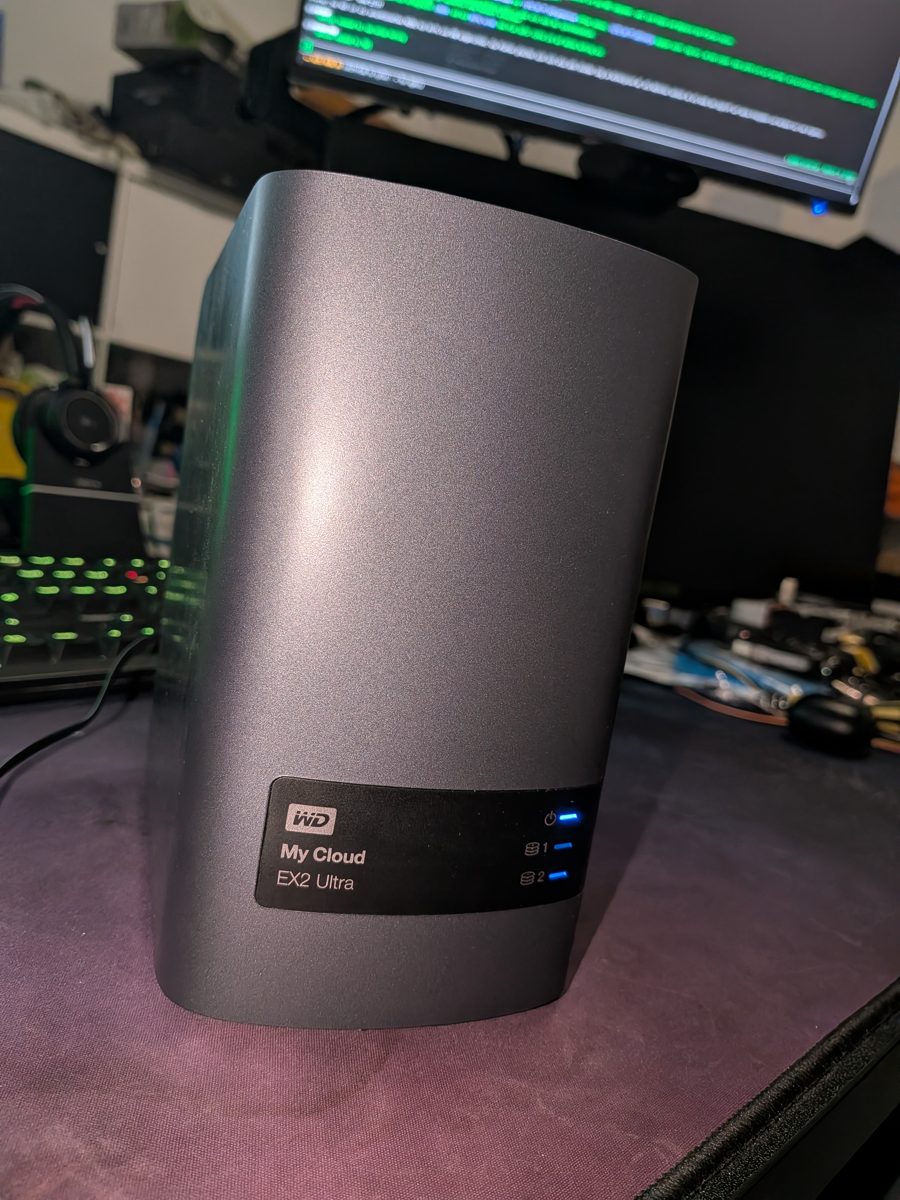
The My Cloud EX2 Ultra is a NAS with two drive bays. Inside are a Marvell Armada 385 with two Cortex-A9 cores at 1.33 GHz, 1 GB of RAM and 256 MB of NAND flash. That is enough for a home NAS, even ten years after its launch.
The problem is the software. According to the Western Digital lifecycle policy, support for the EX2 Ultra runs from February 2016 to December 2027, and the device is already in the "Limited Updates" phase: bug fixes and new features may stop, only critical security issues are still addressed. After the end, the same policy allows WD to discontinue all updates, including security updates, and to switch off cloud services. Anything that depends on a cloud service then stops working.
For me that means: from 2028 an unpatched system with Samba, a web interface and remote access would sit in my network. Remote access via the WD cloud goes away anyway. A NAS, however, should keep running for years. OpenWrt officially supports the EX2 Ultra, receives regular updates and can be upgraded with sysupgrade. In return there is no WD app and no cloud, only what you set up yourself.
My goal was an encrypted NAS with mirrored disks that stays locked after power-on until I log in via SSH and enter the passphrase. Only then should the shares be reachable via SMB.
What you can take away: Check with the manufacturer how long your NAS will receive security updates. A device without updates does not belong on a network, not even a home network.
First: back up the entire flash
Under My Cloud OS 5, SSH can be enabled in the web interface. You then log in as the user sshd, not as admin, with the password from the web interface. That cost me one failed attempt.
The flash is split into eight partitions: U-Boot, kernel (uImage), uRamdisk, image.cfs, rescue firmware, config and two reserve areas. Before anything is overwritten, I back up every partition with nanddump to another computer. Reading a partition twice and comparing the checksums tells you the backup is correct. Occasional messages about corrected single-bit errors are normal for NAND.
# on the PC, adjust the NAS address; the WD firmware asks for the sshd password
for i in 0 1 2 3 4 5; do
  ssh sshd@NAS-IP "nanddump -q /dev/mtd$i" > mtd$i.bin
done
sha256sum mtd*.bin > SHA256SUMS
What you can take away: A backup alone is not a way back. Before the first write, make sure you know how to reach the device if it no longer boots. For the EX2 Ultra that means: have a serial console ready. That is exactly the step I skipped.
Installing OpenWrt
In the OpenWrt Firmware Selector there are two files for the initial installation of the EX2 Ultra: squashfs-uImage-factory.bin for the kernel and squashfs-image-cfs-factory.bin for the file system. I checked both against the OpenWrt SHA256 list and copied them via SSH to /tmp on the NAS. The instructions from the original pull request consist of two commands:
flash_eraseall /dev/mtd1 && nandwrite --markbad -p /dev/mtd1 /tmp/*-uImage-factory.bin
ubiformat /dev/mtd3 -f /tmp/*-image-cfs-factory.bin -y
reboot
After that, OpenWrt should have started. Instead, a boot loop began.
The brick: a boot loop instead of OpenWrt
The disks spun up, the power LED blinked, and after a few seconds the device rebooted. The same without disks, and also with the reset button held. Nothing appeared on the network, no IP address, no response.
Only the serial console showed the cause. The OpenWrt kernel started cleanly but could not attach the UBI volume with the file system:
UBI: EOF marker found, PEBs from 27 will be erased
ubi0 error: the layout volume was not found
Kernel panic - not syncing: VFS: Unable to mount root fs on unknown-block(0,0)
Rebooting in 1 seconds..
The mistake was ours. After the ubiformat, we had attached the new UBI with ubiattach under the still running WD kernel 4.14 as a check. That kernel very likely resized the volumes and wrote management data behind the end marker of the OpenWrt image. On first boot, the OpenWrt kernel discards everything behind this marker, including the volume table. This is not proven, but it matches the log.
Reading the U-Boot image from the backup revealed two things. First, there is an emergency boot via the reset button that loads /boot/uImage and /boot/uRamdisk from a FAT-formatted USB stick. Second, U-Boot also looks for /GrandTeton/u-boot.bin and reflashes itself with it. Such a file should never be on a rescue stick.
What you can take away: After flashing, do not touch anything with the old system "just to check". And whenever something behaves unexpectedly, read the console first instead of guessing causes. My first guess, that the old WD ramdisk was to blame, was wrong.
Rescue with a Flipper Zero as serial console
The EX2 Ultra board has solder pads for the serial interface. I soldered connections to these pads and attached three wires: ground, RX and TX. The 3.3 volt line stays unconnected. The 3.3 V level matters: a classic USB serial adapter with a 9-pin connector uses RS-232 levels of about ±12 V and can damage the processor.
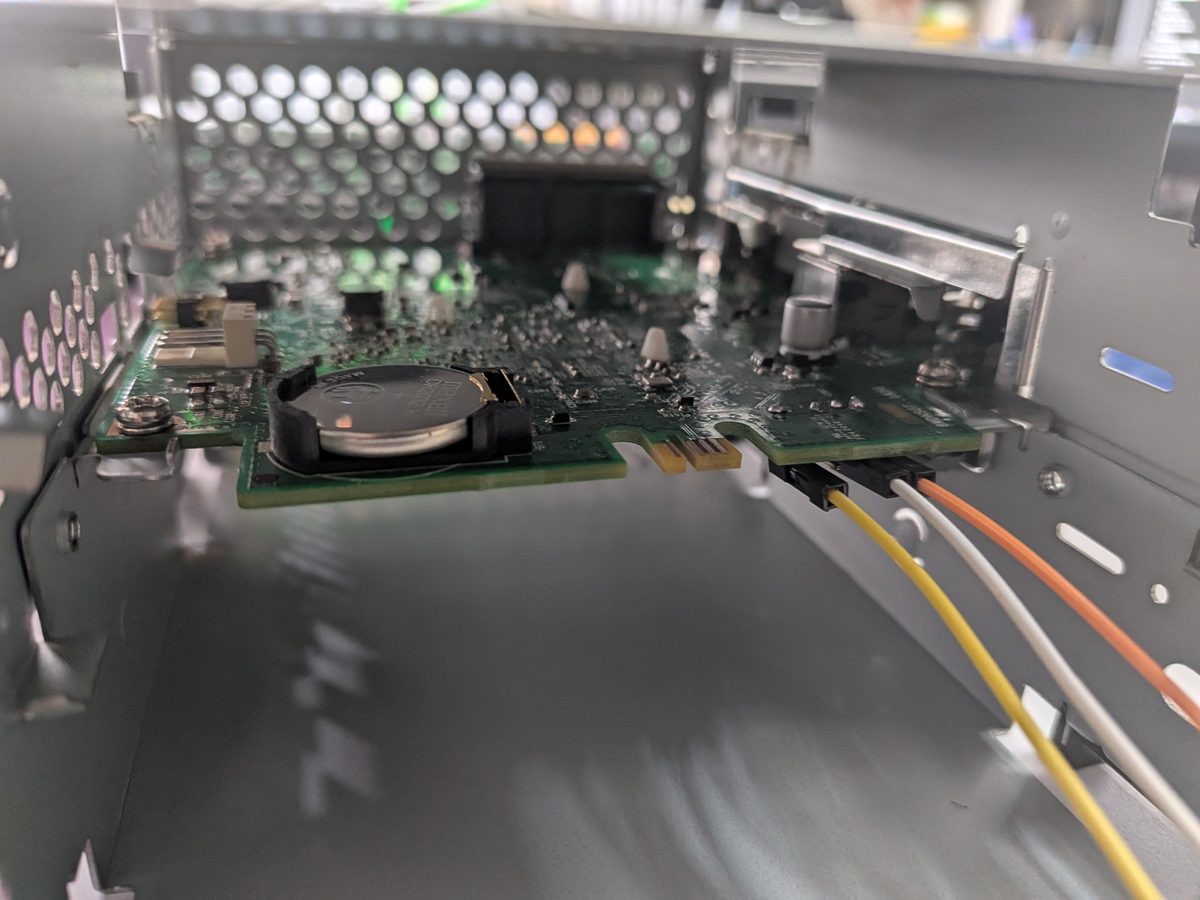
The adapter was a Flipper Zero running the Unleashed firmware. Its app GPIO → USB-UART Bridge turns it into a USB serial adapter with 3.3 V levels. Pin 13 is TX, pin 14 is RX, ground is on pin 8, 11 or 18. The lines are crossed: TX of the Flipper to RX of the NAS and vice versa. On the computer, the Flipper then appears as /dev/ttyACM0, set to 115200 baud, 8N1.
The next hurdle: U-Boot does not stop on just any key. Only the key 1 interrupts the one-second countdown, after which the prompt Marvell>> appears. My script therefore keeps sending ones from the first U-Boot line onwards.
TFTP was not an option. The network port is attached to egiga2, and U-Boot only reported mvNetaPortEnable failed when activating it. So the OpenWrt rescue system (initramfs-kernel.bin, 6.6 MB) came over the serial line: U-Boot accepts files via YMODEM with loady. At 115200 baud this took a little over ten minutes, and in the video the Flipper's TX counter is rising.
Marvell>> loady 0x2000000        # start YMODEM upload, then run ymodem_send.py on the PC
Marvell>> iminfo 0x2000000       # verify the checksum of the loaded image
Marvell>> bootm 0x2000000        # boot OpenWrt from RAM

# in the running rescue system (nothing of this is saved):
/etc/init.d/dnsmasq stop                       # no foreign DHCP server on the LAN
ip addr add FREE-IP/24 dev br-lan
cd /tmp && wget http://PC-IP:8080/sysupgrade.bin
sha256sum sysupgrade.bin                       # compare with the OpenWrt list
sysupgrade -T sysupgrade.bin && sysupgrade -n sysupgrade.bin
The official sysupgrade.bin cleanly reformats the UBI in the process. After that, OpenWrt 25.12.5 booted from flash, and it has kept doing so. I never touched U-Boot itself and never saved an environment variable.
What you can take away: When the network does not work, the serial line almost always still does. Slow, but reliable. And a Flipper Zero is a usable UART adapter when no other one is at hand.
Fan swap: Noctua instead of Sunon
From the factory, a 40 mm Sunon fan sits in the frame. I replaced it with a Noctua NF-A4x10 FLX (affiliate link: if you buy something, I get a small commission and the price does not change for you), which runs much more quietly. The Noctua is one to two millimetres too large for the holder. A file or a utility knife fixes that quickly, the plastic is easy to work.
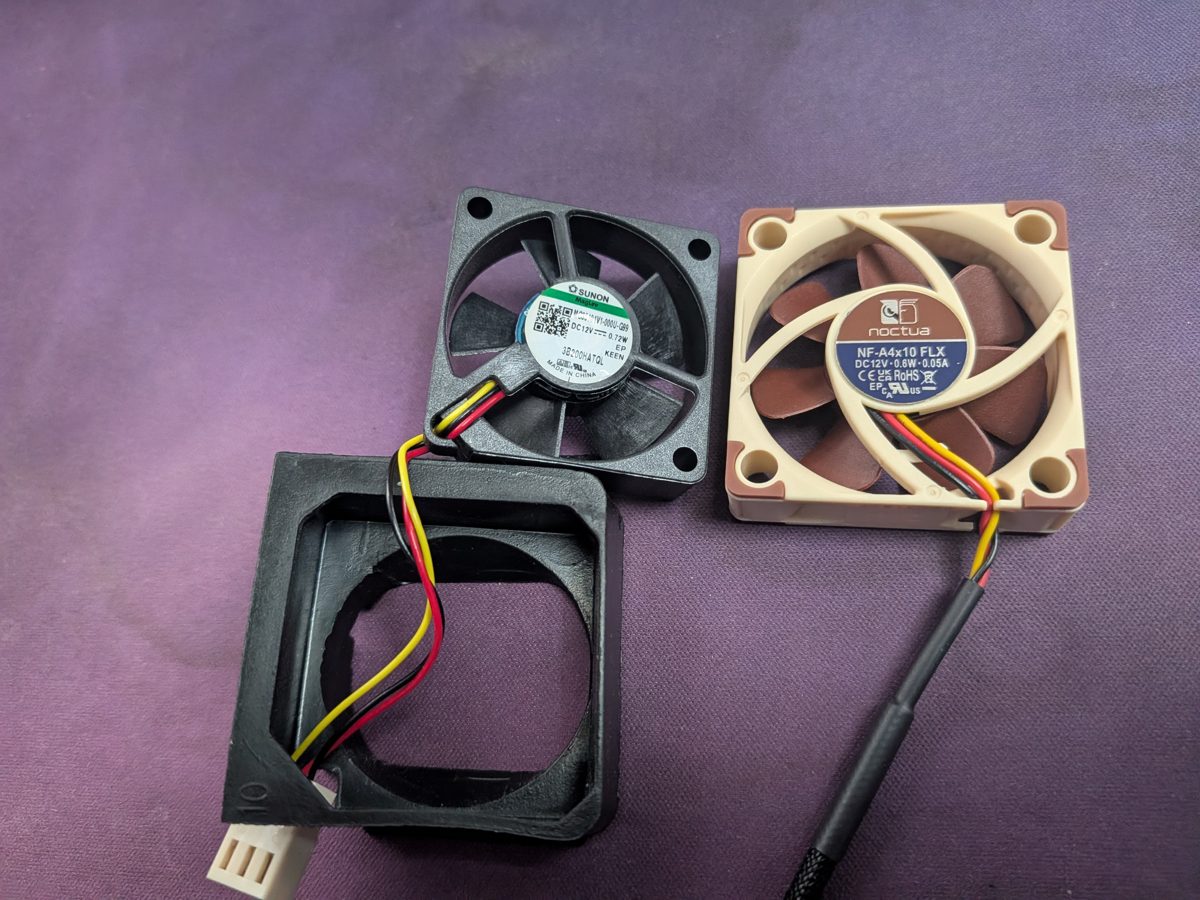
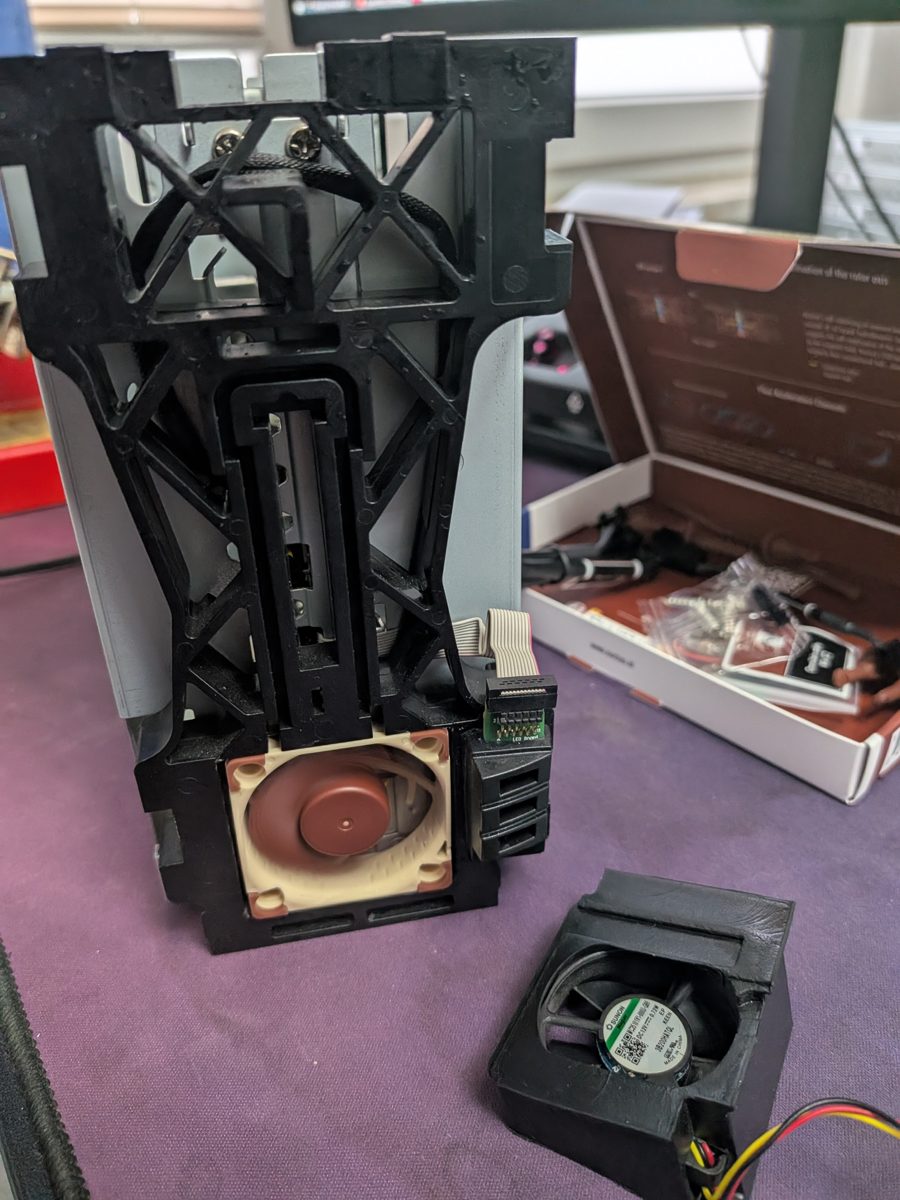
The fan is not connected to Linux but to a microcontroller on the board. Without commands it runs at full speed. That is safe, but loud. The next section shows how to control it.
The microcontroller: fan, power LED and temperature
The WD firmware talks to the microcontroller via /dev/ttyS1 at 19200 baud. Every packet has seven bytes, starting with FA and ending with FB. The commands come from two projects that reverse-engineered the protocol: mcm-daemon and mcm-fancontrol. I tested every command individually on the EX2 Ultra.
FA 03 01 00 00 00 FB: device ready. After this the power LED stops blinking.FA 03 08 00 00 00 FB: read the case temperature. The raw value is converted to degrees via a table.FA 02 01 00 00 00 FB: read the fan speed. Revolutions per minute = 300000 / raw value.FA 02 00 XX 00 00 FB: set the fan level, XX from00(off) toD2(full speed).FA 26 00 XX 00 01 FB: power LED. XX =11blue,41blue pulsing,24red blinking,22orange blinking,01off.
With the Noctua I measured every level. Level 9 gives about 4480 revolutions per minute, level 8 about 4100, level 7 about 3500, level 6 about 2750, level 5 about 2030 and level 4 about 1630. At levels 1 and 2 the Noctua stands still. Level 3 keeps it at about 1200 revolutions, but only when coming from above. Twice it stopped when stepping down to level 3. That is why level 4 is my lowest running level, and from standstill the fan always gets three seconds of level 9 as a start-up boost.
This became the wd-mcu service, a shell script with a procd init. Every 30 seconds it reads all available temperatures: the case via the microcontroller, the CPU, the network PHY and both disks via the kernel driver drivetemp. It does not query sleeping disks, so it does not wake them. Each sensor has an off, an on and a full-speed threshold, for example 38, 40 and 50 °C for the disks and 65, 70 and 75 °C for the CPU. If all sensors are below their off threshold, the fan stops.
- Power LED blue: everything is fine.
- Power LED blue pulsing: both disks are asleep.
- Power LED red blinking: the fan reports no speed even after the start-up boost.
- Power LED orange blinking: the service is not running, the fan is at full speed.
- Drive LED violet blinking: disk present, NAS still locked. Drive LED blue: unlocked, flickers on access. Drive LED red: mdadm has marked the disk as faulty.
The drive LEDs are connected directly to GPIO pins and only know on and off, they cannot pulse smoothly. Violet comes from red and blue at the same time. With the kernel's blink timers, the two colours ran out of phase, and the result was red and blue alternating. A small background process therefore switches both colours at the same moment. For stty, the minimal OpenWrt Busybox needs the package coreutils-stty.
What you can take away: Measure the fan levels with your own fan instead of copying values. Quiet fans in particular do not start reliably at the lowest levels.
Disk tests: when 385 MB/s is a lie
At first, two WD Red WD40EFAX with 4 TB were in the device. A pure read test delivered 385 MB/s, equally fast across the whole disk. That could not be right, the datasheet says about 180 MB/s. The WD40EFAX is an SMR drive, and areas that were never written are apparently returned by its firmware directly as zeros, without reading the platter. So I had only measured the SATA link. Only after a write test did honest values appear: about 190 MB/s on the outside, 151 MB/s in the middle and 77 MB/s on the inside.
I then switched to two 8 TB disks, a WD Red Plus WD80EFPX and a Seagate SkyHawk ST8000VX0022, both with conventional CMR recording. Measured raw and sequentially with dd, 4 GiB each at the start, middle and end of the disk, plus 20 GiB of sustained writing:
- WD80EFPX read: 233, 184 and 99 MB/s. Write: 225, 180 and 97 MB/s. Sustained write: 210 to 216 MB/s.
- ST8000VX0022 read: 238, 204 and 117 MB/s. Write: 187, 199 and 116 MB/s. Sustained write: 222 to 226 MB/s.
- Both at once: 469 MB/s read, 297 MB/s write. When writing in parallel, the processor is the limit.
Before the test I read the SMART values with smartctl. The WD80EFPX had 182 CRC errors in its counter, transmission errors from its previous use. During all tests in the NAS the counter did not increase. The Seagate has more than 66,000 power-on hours and reports that it once ran too hot. For data that matters to me, I only trust it as part of a mirror.
What you can take away: A read test on an empty SMR disk tells you nothing. Write first, then read.
Encryption: the benchmark that misleads
The Armada 385 has its own crypto unit called CESA. With it, cryptsetup benchmark showed about 94 MiB/s for AES-CBC, but only 47 to 54 MiB/s for AES-XTS in software. So I first chose CBC with ESSIV and put btrfs RAID1 on top of two encrypted disks. The first large copy then managed less than 20 MB/s.
The analysis showed two causes. First, dm-crypt does not use the CESA at all. /proc/crypto shows essiv(cbc-aes-neonbs,sha256-neon) for the drive, the NEON software implementation, and the CESA interrupt counter did not move. The benchmark measures through a different kernel interface and got the hardware, dm-crypt does not. Second, btrfs RAID1 on top of two LUKS devices encrypts every block twice, once per disk.
A test with dm-crypt on a RAM disk, without any disk limit, confirmed this:
- AES-CBC-ESSIV with 128 bits, encrypted once: 42 MiB/s write, 59 MiB/s read.
- AES-XTS with 128 bits, encrypted once: 54 MiB/s write, 57 MiB/s read.
- AES-CBC-ESSIV, encrypted twice as with btrfs RAID1 over two LUKS: 22 MiB/s write.
- AES-XTS, encrypted twice: 27 MiB/s write.
In software, XTS writes faster than CBC and is also the more secure mode. The biggest effect, however, comes from encrypting only once. The final setup is therefore: both disks as mdadm RAID1, on top a single LUKS2 with aes-xts-plain64 and a 256-bit key, which means AES-128, and on top of that btrfs with duplicated metadata. btrfs still detects damaged files through its checksums, but can no longer repair data errors from a second copy. mdadm handles read errors of a disk.
ZFS with native encryption would have combined both, a single encryption and self-healing. However, there is no ZFS package in OpenWrt for the EX2 Ultra, and the developers advise against it on a 32-bit ARM with 1 GB of RAM.
What you can take away: Benchmark encryption with the tool you will actually use. cryptsetup benchmark and dm-crypt can use very different implementations on the same hardware.
mdadm and a second crash
Installing the mdadm package made the NAS reboot twice in a row. The kernel modules md-mod and raid1 loaded fine on their own, and apk add --no-scripts mdadm also went through cleanly. My suspicion, which I deliberately did not reproduce: the install script starts the service immediately, and it scans all block devices with mdadm --assemble --scan, including the raw NAND partitions holding U-Boot. Since mdadm may only scan the SATA disks, everything has been stable:
apk add --no-scripts mdadm
cat > /etc/config/mdadm <<'EOF'
config mdadm
	list devices "/dev/sd*"
EOF
/etc/init.d/mdadm enable && /etc/init.d/mdadm start
A second lesson from this crash: the half-installed files were 0 bytes in size. If you delete such leftovers directly in /overlay/upper while the overlay is mounted, the system reports Stale file handle. So always clean up via the normal paths or after a reboot.
The finished NAS
After every boot the NAS is locked. The drive LEDs blink violet, SMB is off. When I log in via SSH, a script in /etc/profile.d asks whether I want to unlock. After the passphrase, nas-entsperren checks the RAID state, opens LUKS, mounts btrfs and only then starts the SMB server ksmbd. If a disk is missing, it asks first. nas-sperren does everything in reverse order.
For SMB I chose ksmbd instead of Samba because it runs in the kernel and needs less computing power. Every user gets a Linux account without login, a private share with their name and access to the shared share gemeinsam. There, the setgid bit makes sure new files belong to the group. nas-benutzer creates users, changes passwords and deletes them again. On deletion the data is not removed but moved to an archive.
hd-idle puts the disks to sleep after 120 minutes without access. Shorter times mean more spin-up cycles and therefore more wear. The initial sync of the 8 TB RAID ran at about 206 MB/s, mdadm estimated a good ten hours for it. How fast SMB is with the new setup in everyday use, I have not measured yet. Based on the RAM test I expect about 50 MB/s when writing instead of the 20 MB/s of the first attempt.
ssh root@NAS-IP
NAS ist gesperrt (SMB aus).
Jetzt entsperren? [J/n]
Passphrase für das NAS:
NAS entsperrt: 7.3T gesamt, 7.3T frei, RAID [UU]; SMB aktiv (gemeinsam und je Benutzer).
Rebuild it: all scripts
All scripts run on OpenWrt 25.12.5 with the Busybox shell. I published them as they run on my NAS, with German comments and messages. nas-einrichten completely wipes both disks, and the script explicitly asks for confirmation.
- openwrt-konfig.txt: package list, restricting mdadm to /dev/sd* and the hd-idle configuration
- wd-mcu.sh: fan and LED service, to /usr/sbin/wd-mcu
- wd-mcu.init: its procd init, to /etc/init.d/wd-mcu
- nas-gemeinsam.sh: shared functions, to /usr/lib/nas-gemeinsam.sh
- nas-einrichten.sh: one-time setup: GPT, mdadm RAID1, LUKS2 XTS, btrfs, shares
- nas-entsperren.sh: unlock, mount, start SMB
- nas-sperren.sh: stop SMB, unmount, close LUKS
- nas-benutzer.sh: create users, change passwords, delete, list
- nas-profile.sh: prompt on SSH login, to /etc/profile.d/nas.sh
- ymodem_send.py: YMODEM sender for uploading to U-Boot over the serial line
- serial_expect.py: simple expect for the serial console, also sends the key 1 to U-Boot
- serial_read.py: reads the serial console
The order if you want to rebuild it: back up the flash, connect and test the serial console, flash OpenWrt and afterwards do not attach anything with the WD system, install the packages, restrict mdadm, set up wd-mcu and measure the fan levels yourself, then run nas-einrichten. The paths of your own scripts belong in /etc/sysupgrade.conf so that they survive an upgrade.
Numbers at a glance
- Western Digital states support for the My Cloud EX2 Ultra from February 2016 to December 2027; after that, even security updates may stop.
- The YMODEM transfer of the 6,657,783-byte rescue system over 115200 baud took 611 seconds.
- In the RAM test, dm-crypt with AES-XTS-128 wrote 54 MiB/s with single and 27 MiB/s with double encryption on the Armada 385.
- The Noctua NF-A4x10 FLX reached at most about 4480 revolutions per minute on the EX2 Ultra fan control and stopped below level 3.
References
- Western Digital: Product Lifecycle Support Policy
- Discussion on Reddit: Heads up, WD My Cloud NAS (most devices) losing …
- OpenWrt Firmware Selector: WD My Cloud EX2 Ultra
- OpenWrt pull request #2040: support for the EX2 Ultra
- mcm-daemon: microcontroller protocol
- mcm-fancontrol by Nico Maas
- Nico Maas: WD My Cloud Mirror Gen2 with Debian 11 (German)
Remarks
- The software and configuration work was carried out by my SoftwareSklave (software slave), while soldering, the fan swap and the decisions were mine. The brick is on its account, and so is the rescue.
- With a quiet fan the EX2 Ultra gets warm: at idle the case was around 49 °C and the Seagate disk around 46 °C, and the fan ramped up accordingly.
View OpenWrt for the EX2 Ultra
Links to the original source and the Web Archive open in a new tab.